
Invoices are generated and sent between the 1st and the 6th of each month for all projects with Complete Project Status within the prior month.
For example, if your Project Status is updated to Complete Status and IDs are confirmed in February, this project would be included on your February invoice which is generated between March 1st - 6th. This automated invoice will provide a summary of all projects with the Complete Status for the prior month and will include a line item details for each project.
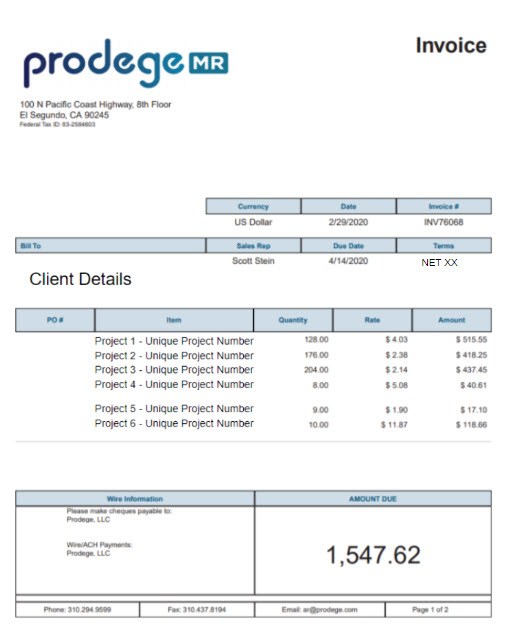
Within each invoice, the Line Item details include PO Details, Project Name, and Prodege Project ID for reference.
In the below example, the line item details will include the details from the project in the POD platform which sill include the following:
PO number: 1908778
Project Name: Pet Study
Prodege peeq Project Number: 2148420
Example: 1908778 Pet Study | 2148420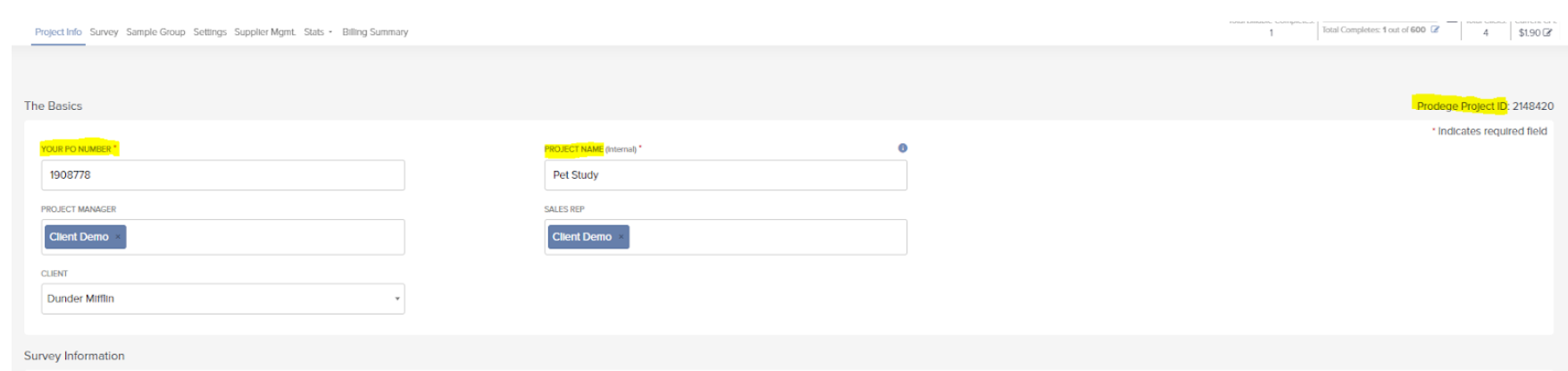
Once projects are approved for billing, the total invoiced amount is located on the ‘Billing Summary’ tab within each project:

If a project has not received any new clicks in 15 business days, Prodege peeq automatically transitions the project from to ‘Complete’ status. For additional details, please review the Auto-Transition Project Status article.
Have more questions or need additional support?
Our experts are happy to do a screen share and walk-through this process with you.
Submit a request or Live Chat with us!