
Supplier management allows you to bring in additional sample from outside Prodege peeq, also known as extremal suppliers, without any changes to your survey programming. Sample from suppliers can also be distributed in a Sample Group. For additional information, please see our Supplier Distribution article.
Adding a new Supplier
To add a new ‘Suppliers’ to simply click on the ‘Suppliers’ at the top of the Dashboard and click "Add New Supplier"
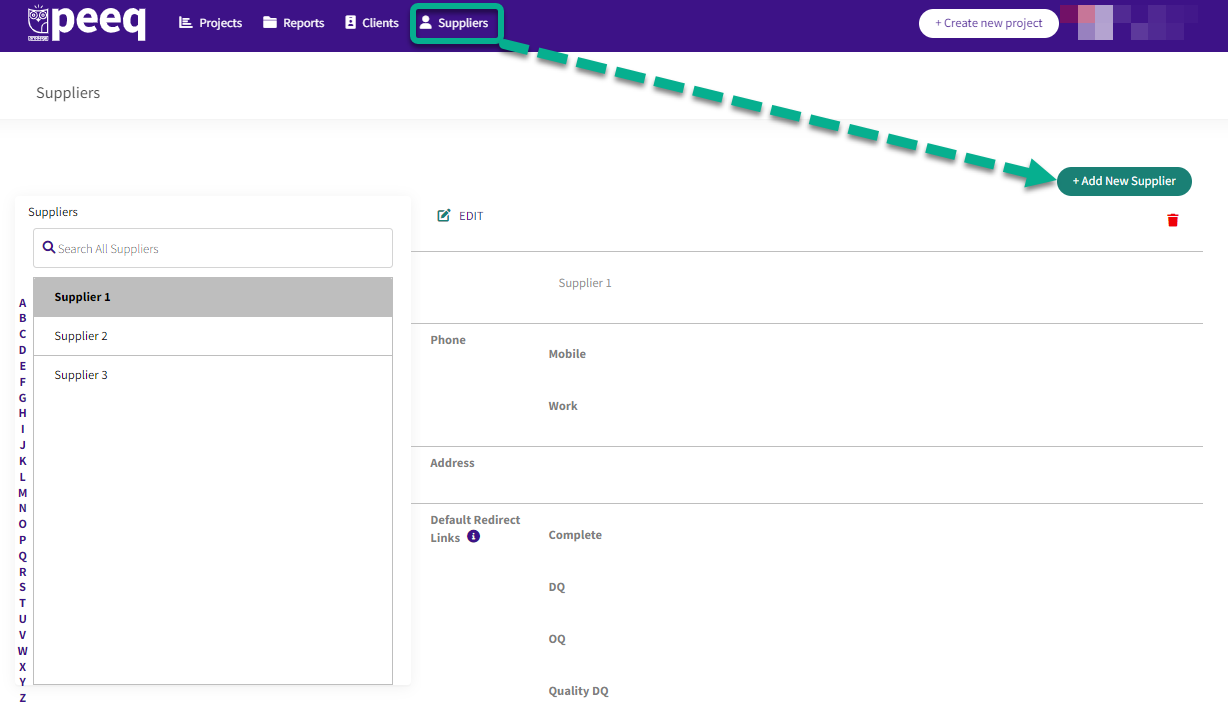
Name the supplier as you want it to appear in your Prodege peeq account and enter the ‘Default Redirect Links’: Complete, OQ and DQ. The redirects entered here will be the default redirects when setting up this supplier in a project.
Additional changes to the redirects can be made during project setup on the ‘Supplier Mgmt’ tab, as some suppliers may require different redirects on a per-project basis.
Have more questions or need additional support?
Our experts are happy to do a screen share and walk-through of this process with you.
Submit a request or Live Chat with us!