
Bulk Link Upload allows you to upload multiple (bulk links) which can be assigned to specific panelistids or prior transaction ids. This feature is useful when re-contacting users from a prior project and you need specific users to be assigned a unique link.
For example, you want panelistid 123 to go to survey1.com and panelistid 2 to go to survey2.com.
To utilize the bulk link upload feature w/ recontact:
- Create your project and click on "Link Setup". Switch to the "Bulk Link Upload" option.
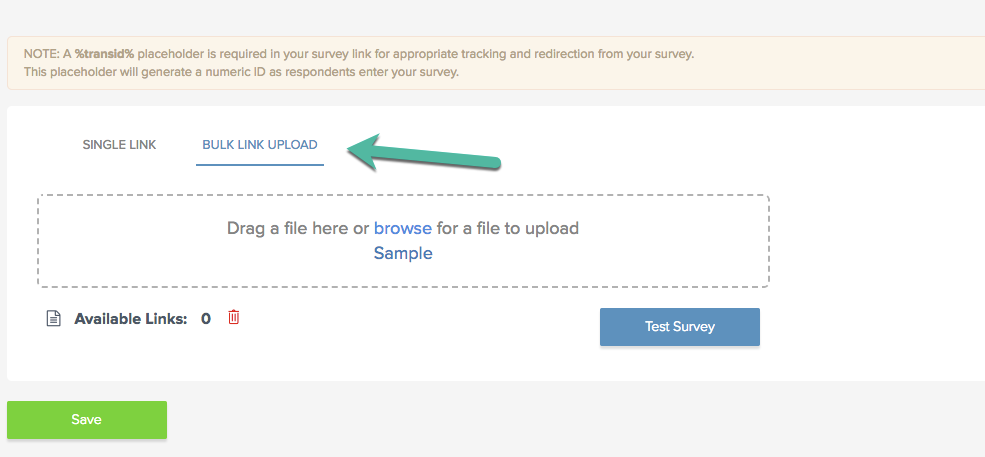
- For file format instructions, access the "Sample" file for details. To specify different links provided prior transaction ids or panelist ids, include the corresponding column header as shown in the sample file. You cannot specify a combination of panelist IDs and transaction IDs. Please note: Each link must contain a new transaction ID placeholder %transid% so it can be collected by your survey software and returned back to peeq. You can still utilize bulk links (links assigned randomly as a panelist interacts with your survey) by uploading one column in your file "SurveyURL" with no columns indicating PanelistID or TransactionID.
- If you have included specific PanelistIDs OR TransactionIDs in your bulk link, our platform will automatically adjust your project settings to include only the panelist or transaction IDs which you provided links for in your Bulk Link Upload. (In the example below, I had previously uploaded 2 links containing two distinct panelist IDs).
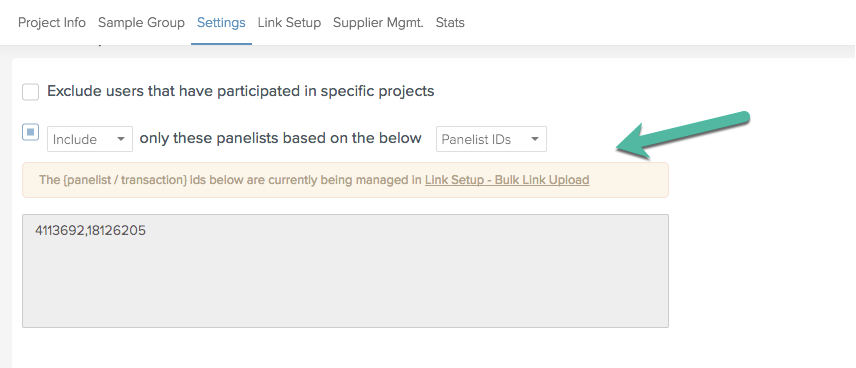
- When going live with your project, only those members (either specified by panelistid or transactionid) will be invited to your survey and will be assigned the link indicated from your file.
Have more questions or need additional support?
Our experts are happy to do a screen share and walk-through of this process with you.
Submit a request or Live Chat with us!